
Dr. Prius / Dr. Hybrid
Pika Tech LLCAuto & Vehicles
3.0253.00 Reviews
- Version
- 7.03
- Installs
- 100.00K
- Age Rating
- Everyone
Screenshots
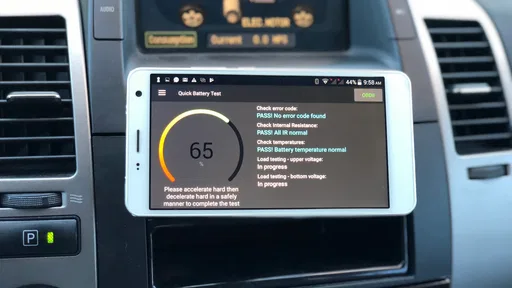
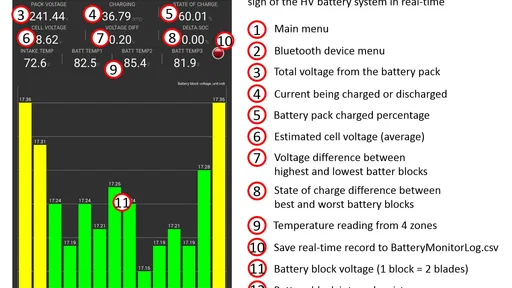
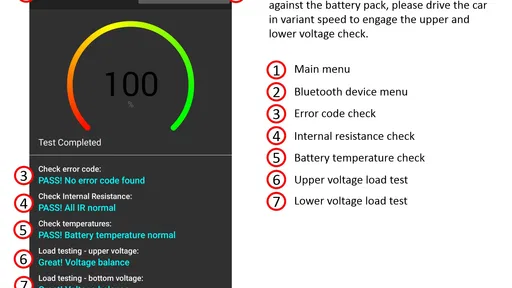
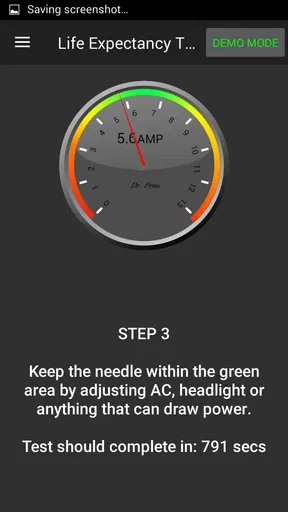
Our Review of Dr. Prius / Dr. Hybrid
 Analysis by Appyee
When a hybrid starts behaving differently, it can be hard to tell whether the battery needs attention or whether something else is going on. I find Dr. Prius / Dr. Hybrid most useful as a way to inspect Toyota and Lexus hybrid battery information through a compatible OBD2 adapter. It is a focused car tool, not a substitute for a mechanic, and that distinction matters: its readings can help you ask better questions, but they should not be treated as a final diagnosis.
Where setup can get stuck
The first hurdle is not usually the app itself; it is getting the whole connection ready. You need an OBD2 adapter that works with your vehicle and the app, and you need to know where your car’s OBD2 port is. A connection problem can come from the adapter, the phone’s Bluetooth connection, the vehicle, or the way the adapter is seated. I would check those basics before deciding the app is unreliable.
Compatibility deserves a little care, even if you own a Toyota or Lexus hybrid. A model name alone does not guarantee that every adapter or every available function will work the same way. Before relying on the app for a battery check, confirm that your vehicle and adapter are suitable. If the connection does not appear, turn the car off and reseat the adapter, then retry the pairing process rather than repeatedly switching between different settings at once.
It also helps to start with the car parked somewhere safe. Reading vehicle information while driving is a distraction, and looking at the phone will not help you understand what is happening on the road. I would connect and inspect the display before setting off, then leave any further checks until the vehicle is stopped.
Getting Started with Dr. Prius / Dr. Hybrid
First things first, setting up the Dr. Prius / Dr. Hybrid app is a breeze. You just need a compatible OBD2 adapter, which plugs into your car’s OBD2 port. Once you’ve connected your adapter, you can pair it with the app via Bluetooth. The app supports a range of hybrid models, so whether you’re driving a Prius, a Camry Hybrid, or a Highlander Hybrid, it’s likely got you covered.
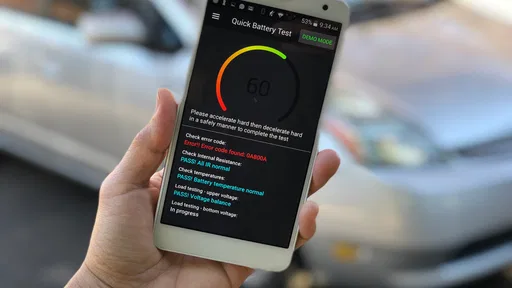
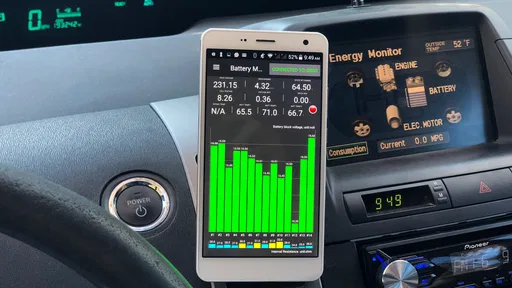
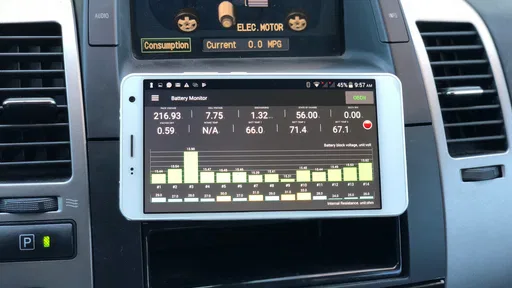
The interface is super user-friendly. After launching the app, you’re greeted with a dashboard that displays all the vital stats of your hybrid battery. From state of charge to voltage and temperature, it’s all there at your fingertips. Plus, the real-time data updates keep you informed of your vehicle’s health as you drive.
A sensible first check
I would treat the first session as a baseline, not as a pass-or-fail exam. Make sure the car is stationary, establish the connection, and take a moment to understand what the displayed information represents before drawing conclusions. If you are comparing readings later, try to use similar conditions; a snapshot taken at a different point in a drive may not be directly comparable. This simple habit can prevent a normal change in operating conditions from looking like a sudden battery problem.
If the display seems incomplete, avoid assuming that the battery is failing. Check the connection first, and make sure you selected the right vehicle context if the app asks for one. An OBD2 adapter is a communication bridge, not a repair tool, so a weak or incompatible connection can limit what the app can show. If you still cannot get a useful reading, checking the adapter’s compatibility is a more practical next step than repeatedly reinstalling the app.
Features That Stand Out
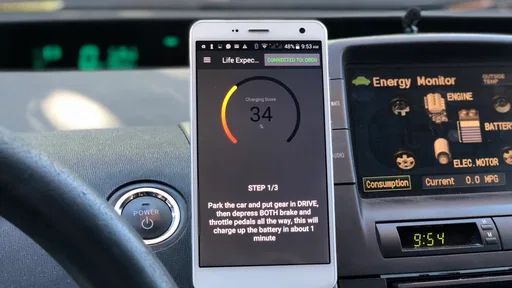
One of the features that caught my attention is the battery life expectancy test. This unique tool analyzes your hybrid battery's health and predicts its remaining lifespan. For those of us who fret over battery degradation, this is a game-changer.
Another cool feature is the ability to monitor your car’s performance through various metrics. You can track your fuel efficiency, check engine codes, and clear warning lights. It’s like having a diagnostic tool without the hefty mechanic’s bill.
The app also offers an education section, which is super handy. It provides detailed explanations about hybrid batteries, common issues, and how to maintain them. It’s perfect for those who want to deepen their understanding of their vehicle’s inner workings.
Readings are clues, not a repair verdict
The most helpful way to use a battery estimate is as one part of a decision, rather than a promise about how long the pack will last. A predicted lifespan cannot tell you exactly when a fault will happen, and it should not be the only reason to buy or reject a used hybrid. If you are considering a car, I would use the result to frame follow-up questions and, when the purchase matters, arrange an independent inspection as well.
There is a similar trade-off with diagnostic codes. Being able to see a code can make a warning less mysterious, but clearing a warning light is not the same as fixing its cause. If a warning returns, or the car’s behavior changes, keep a note of what happened and seek proper diagnosis instead of repeatedly clearing the alert. That approach makes the app more useful: it gives you a starting point for a conversation, not a reason to ignore a persistent problem.
The User Experience
Using the app is a seamless experience. Its design is intuitive, and the information is presented clearly, which is essential for those of us who aren’t car experts. I found the app’s performance to be smooth, with minimal lag or connectivity issues.
One thing I really appreciated was the active community support. The developers are responsive and continuously update the app, ensuring compatibility with the latest car models and OBD2 adapters. Plus, there’s a forum within the app where users can share tips and experiences.
A realistic use on an ordinary day
Picture noticing a change in fuel use or seeing a dashboard warning before a planned trip. I would not try to diagnose the car while heading out. Instead, I would park, connect the adapter, use the app to review the available battery information or codes, and write down what I saw. If the reading points to something worth checking, that record gives a repair shop a clearer starting point than “the car felt a bit off.” If everything looks ordinary, I would still pay attention to the warning itself and the vehicle’s behavior rather than treating one reassuring screen as proof that nothing needs attention.
This is also a useful way to make a used-hybrid viewing more informed, provided the seller is comfortable with an OBD2 check and you have confirmed the setup beforehand. The app can help you look beyond a quick test drive, but it cannot replace a full mechanical inspection or reveal every possible issue. I would not let a single estimate settle a major purchase decision.
How it fits beside other options
Compared with a general-purpose code reader, this app is more appealing when your main concern is the hybrid battery in a Toyota or Lexus. A basic reader may be enough if all you want is to see a warning code, while this app’s focus is more relevant to someone trying to understand battery condition. On the other hand, a repair shop’s diagnostic process is the better choice when you need a confirmed fault, a repair plan, or hands-on testing.
That focus is also a limitation. If you want a broad tool for many makes, routine maintenance reminders, or a complete service history, this is not the all-purpose car-management app I would choose. Its value is strongest when you already have a compatible hybrid and adapter and want a closer look at battery-related information. The more your needs move away from that, the more a general scanner or a qualified technician makes sense.
A Few Considerations
While the app is quite comprehensive, it’s worth noting that full functionality requires a one-time purchase. However, I found the investment worthwhile given the peace of mind it provides. It’s like having a backstage pass to your car’s health.
Also, depending on your car model and adapter, there might be some features you can’t access. It’s always a good idea to check compatibility before diving in. But with the vast range of supported models, this shouldn’t be a major concern for most users.
Who is likely to get the most from it?
I would recommend it most to owners who are comfortable doing a basic OBD2 setup and want to keep an eye on a Toyota or Lexus hybrid’s battery condition. It can be especially useful for someone who plans to keep a car for a long time and wants a repeatable way to review its condition, or for a buyer who wants informed questions before paying for a professional inspection. The educational material may also help a curious owner make sense of hybrid terminology rather than relying on guesswork.
I would skip it if you do not have a compatible adapter, want a simple answer without learning what the readings mean, or need an immediate, definitive repair diagnosis. It is also a poor fit if your vehicle is outside its intended Toyota/Lexus hybrid focus. In those cases, a mechanic or a scanner designed for broader vehicle coverage is likely the more direct choice.
Price, support, and what to expect
Dr. Prius is a free Auto & Vehicles app from Pika Tech LLC. It has a 3.0 average from around 1.3 thousand ratings, with more than 100 thousand installs, so it has found an audience, though the rating suggests experiences are not uniformly positive. The app is rated for Everyone, and the current version is 6.59. It runs on Android 5.0 and newer, while optional in-app purchases range from about $14.99 to $38.99 per item.
That means I would try the basic experience and verify the adapter connection before spending money on additional functionality. The purchase decision is more sensible after you know the app can communicate with your particular vehicle. If you are buying an adapter specifically for this purpose, check compatibility before ordering; paying for the app will not solve a hardware mismatch.
Practical verdict
Overall, Dr. Prius / Dr. Hybrid is a focused companion for owners who want more insight into a Toyota or Lexus hybrid battery than a generic warning light can provide. I like the idea of being able to examine battery information and codes in one place, and I think the educational angle can make the results less intimidating. Its usefulness still depends on the vehicle, adapter, and the user’s willingness to treat readings as guidance rather than certainty.
For me, the best reason to try it is preparation: understand what your car is reporting, keep track of anything concerning, and arrive at a repair conversation with more context. The main reason to pass is if you expect the app to replace professional diagnosis or work with any car and adapter. With those expectations set, it can be a practical tool rather than a magic fix.
So, if you’re ready to take control of your hybrid car’s maintenance, give it a try. It’s like having a personal car doctor available anytime you need it.
Verdict
Strengths of Dr. Prius / Dr. Hybrid
- Real-time battery monitoring.
- User-friendly interface.
- Supports multiple car models.
- Detailed diagnostic reports.
- Regular software updates.
Limitations of Dr. Prius / Dr. Hybrid
- Limited free features.
- Requires internet for updates.
- Steep learning curve.
- Compatibility issues with some devices.
- Subscription needed for full access.
Similar Picks in This Category
View All
Android Auto
Google LLC4.1

maxim — order a taxi & food
PT. SITO4.7

Штрафы ГИБДД: проверка с фото
Pays LLC – Штрафы ГИБДД4.7

Номерограм – проверка авто
Авто Ассист4.8

Дром Авто
Дром4.9

Frequently Asked Questions
What is Dr. Prius / Dr. Hybrid, and how does it work?
Dr. Prius / Dr. Hybrid is a diagnostic app designed for hybrid vehicle owners, particularly those with Toyota Prius models. It connects to your car via an OBD2 scanner to monitor battery health, perform tests, and offer real-time data. This helps users maintain their vehicle's performance and prevent unexpected issues.
Is Dr. Prius / Dr. Hybrid compatible with all hybrid vehicles?
While Dr. Prius / Dr. Hybrid is optimized for Toyota Prius models, it also supports other Toyota and Lexus hybrid vehicles. However, compatibility might vary, so it's recommended to check the app's official compatibility list or consult the developer before purchasing an OBD2 scanner for your vehicle.
What features does Dr. Prius / Dr. Hybrid offer?
Dr. Prius / Dr. Hybrid provides several features, including battery health checks, life expectancy tests, and real-time battery monitoring. It also offers features like error code reading and clearing, as well as customizable alerts for maintenance. These tools help ensure your hybrid car runs smoothly and efficiently.
Do I need any additional hardware to use Dr. Prius / Dr. Hybrid?
Yes, to use Dr. Prius / Dr. Hybrid, you'll need a compatible OBD2 Bluetooth scanner. This device plugs into your car's OBD2 port, allowing the app to communicate with your vehicle's onboard computer. Make sure to choose a scanner recommended by the app for optimal performance.
Is there any cost associated with using Dr. Prius / Dr. Hybrid?
Dr. Prius / Dr. Hybrid is a free app, but some advanced features may require in-app purchases. Additionally, you will need to purchase an OBD2 Bluetooth scanner to connect the app to your vehicle. Always verify the costs associated with both the app and the necessary hardware before downloading.
